Field notes
Inside the triage inbox: from raw feedback to a plan
5 min readThe Bugpot team
Feedback collection is the easy half. The half that decides whether your team ships is triage: turning twenty raw reports into a short list of decisions. The Bugpot triage inbox is built around a simple idea. Every report should be one glance away from a decision.
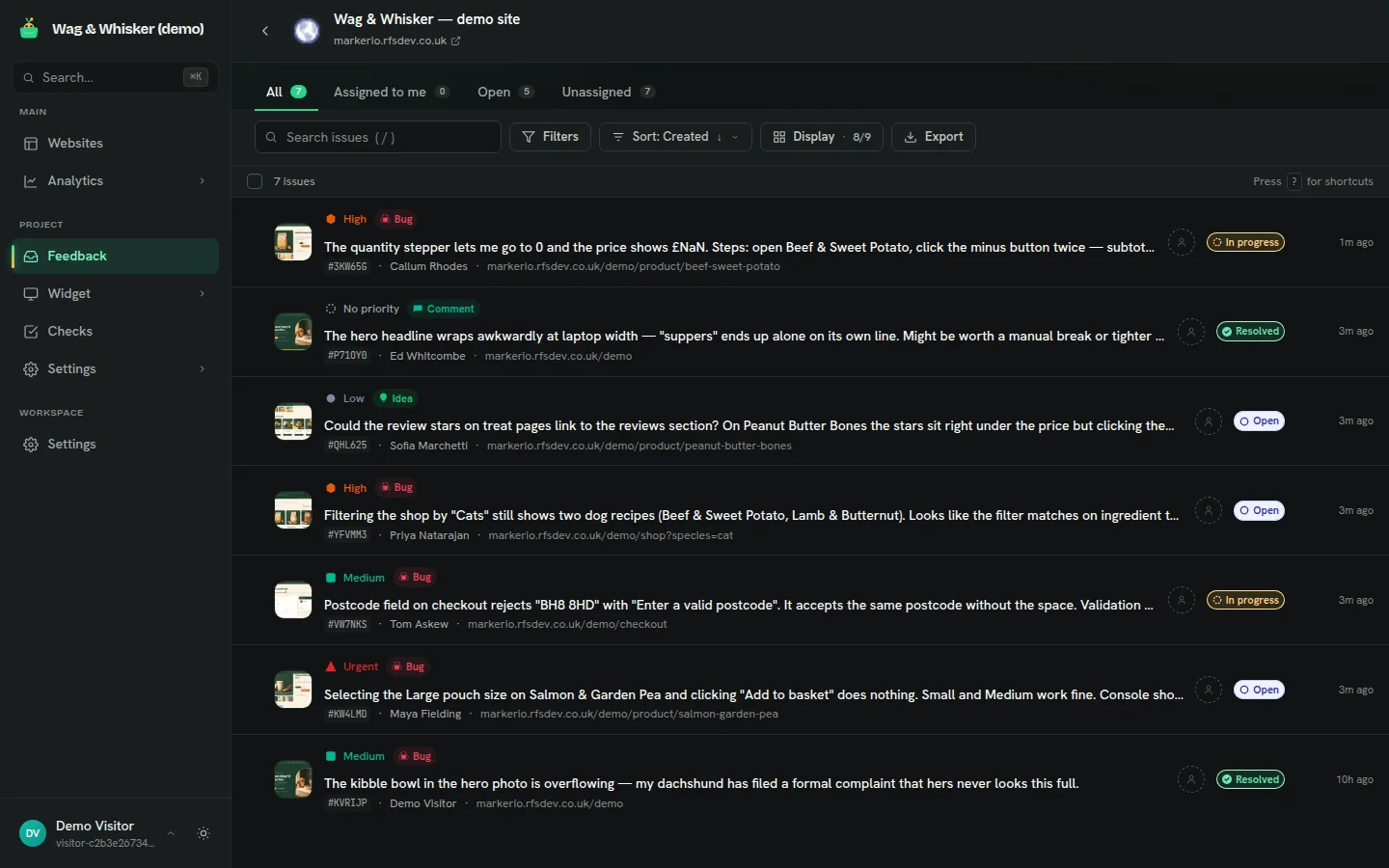
Everything on the row
Each row carries the screenshot thumbnail, the type badge, the priority, the reporter, the page URL and the current status. That density is deliberate. If you have to open a report to know whether it matters, triage takes an hour. If the row tells you, it takes minutes.
Status is a lifecycle, not a label
Reports move through new, in progress, resolved and archived. The tabs across the top (All, Assigned to me, Open, Unassigned) are saved answers to the questions you ask every morning. On the demo inbox above you can see the mix at a glance: two in progress, two resolved, the rest open and waiting for a decision.
Priority is a decision, not a feeling
Bugpot gives you five priority levels from none to urgent. Our advice: use urgent for revenue-blocking bugs only, and let most things be medium. A queue where everything is high is a queue with no information in it. The checkout postcode bug in the screenshot is medium; the add-to-basket failure is urgent, because it takes money off the table.
Filters, search and the escape hatch
You can filter by status, priority, type, assignee and page, and search the full text of reports. When someone above you wants "a list", the export button produces a CSV of the current filtered view rather than the whole database. There are keyboard shortcuts for the regulars; press ? in the inbox to see them.
“A good inbox does not make you faster at reading reports. It makes reading unnecessary for most of them.”
Where to see it working
The screenshots here come from the live demo, where the inbox fills with whatever you file on the demo shop. File three reports, open the inbox, and try getting them from new to resolved. The loop takes about two minutes and teaches more than any feature list.